In today’s world, it’s more important than ever to make sure your devices are protected. One of the main goals of device hardening is to reduce your attack surface. The attack surface is basically everything on your device that an attacker could use to find weaknesses. With reducing the attack surface, You can make it harder for bad guys to compromise an device.
Here are some of the things to keep in mind when you’re working on hardening your devices:
- Patch Management (Windows Updates and Microsoft 365 Apps Updates)
- Encryption (BitLocker)
- Secure configuration (Endpoint Security policies)
- Compliance (Compliance policies)
- Security Baseline (Windows Security Baselines or CIS baselines)
This blog is going to focus on hardening your devices with a security baseline. We’ll be focusing on configuration-focused baselines. We’ve got a few options:
- Microsoft Intune Security Baselines
- CIS baselines
- STIG baselines
- Create your own baseline
Microsoft Intune Security Baselines
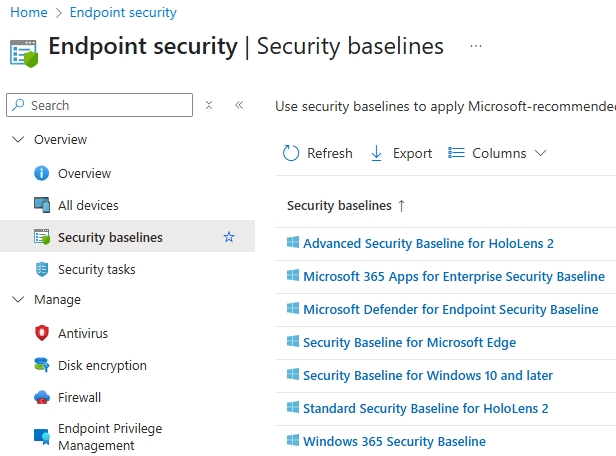
Microsoft Intune Security Baselines are security settings designed by Microsoft that can be configured via Intune. They’re basically Microsoft’s suggestions for making devices more secure. Microsoft Intune Security Baselines are available for Windows, Microsoft 365 Apps (Office), Defender for Endpoint, and other platforms. Microsoft Intune Security Baselines can be used to harden devices and are the first things you should configure on devices.
Advantages:
- Ease of deployment and centrally managed with Intune
- Baselines created by Microsoft security
- Regularly updated (much better that a few years ago)
Disadvantages:
- Potentially less secure then CIS?
- Vendor Lock-in
CIS Baselines
CIS Security baselines are settings based on the best practices set forth by the Center for Internet Security (CIS). This is a non-profit organization dedicated to improving cyber security. CIS has a bunch of different baselines for strengthening devices, and they’re put together through a community effort. The CIS baselines consist of various profiles. The level 1 CIS baseline is made up of settings needed for a basic level of security. The level 2 CIS baseline has stricter settings needed for a higher level of security, like when using sensitive data in an organization. There are lots of CIS baselines out there for all kinds of products and platforms.
Advantages:
- Tiered approach (L1 and L2)
- Community-driven by experts in the field
- Compliant with industry standards (like NIST)
Disadvantages:
- Complexity with implementation
- Operational impact with certain settings (Autopilot for example)
STIG Baselines
The STIG baselines are cybersecurity standards offered by the Defense Information Systems Agency (US Department of Defense). The STIG baselines are mostly meant to be strict configuration settings for the US government and defense sector. There are different STIG baselines available for different platforms, like Windows. Because of how complex and strict the configurations are, it’s usually not a good idea to use STIG baselines in commercial organizations.
Advantages:
- Highest level of security
- Reduced Attack Surface
Disadvantages:
- Reduced functionality
- Limitations in user experience
- Not suitable for all organizations
Create your own baselines
In Intune, you can also create your own Security Baseline. Most settings for device hardening can be found in the Intune Settings Catalog. The good thing about this is that you can build a baseline from scratch yourself. The main drawback is the time and complexity involved. You’ve also got to know your stuff when it comes to device hardening.
The best bet is to start with the Intune Security Baselines as a starting point and, if needed, add in settings specific to your organization using Settings Catalog profiles. You can also use the Intune Open Baseline as a starting point, for example. When you need to meet industry standards (like NIST), you can also think about CIS baselines because CIS controls aligns with several industry standards.
In the near future, I will be writing more blogs on this topic and posting more deep dives for the CIS baselines and Intune Security Baselines.
CIS: CIS Microsoft Intune for Microsoft Windows Benchmarks
Intune Security Baselines: Learn about Intune security baselines for Windows devices | Microsoft Learn
Intune Open Baseline: GitHub – SkipToTheEndpoint/OpenIntuneBaseline: Community-driven baseline to accelerate Intune adoption and learning